EchoAI – The Ultimate AI Assistant for Sngine and Zinkly
Features
33 featuresAI & Chat9
- Multi-provider AI: OpenAI and DeepSeek, with a default provider chosen in the admin panel
- Streaming responses that appear word by word as they are written
- Image generation with OpenAI image models (DALL·E / GPT-Image), plus a personal gallery
- Image and video analysis
- File uploads that can be attached to any message
- Edit messages and switch between response versions
- Built-in web search: automatic or manual mode, result caching, and daily limits per user and per site
- Custom commands and Quick Actions (prompt shortcuts for everyone or per user)
- BYOK (Bring Your Own Key): members can use their own API key
Smart Memory & Personas4
- Long-term memory with categories, pinning, editing and per-user preferences
- Memory backup, export and import
- Custom personas and personality settings, with access control
- Incognito Mode: chats that are never saved to history or memory
Conversation Management5
- Folders, including password-protected folders
- Pin, rename, move, search and bulk-delete conversations
- Public share links (which can be disabled at any time) and importing of shared chats
- Import and export of conversations
- Like/dislike feedback with reasons, plus content reporting
Monetisation4
- Token / credit system with packages and automatic token resets
- PayPal payments with webhook confirmation
- Custom or bank-transfer payments that admins review
- Admins can add tokens to any user manually
App Experience5
- Installable PWA for desktop and mobile
- Push notifications via Firebase Cloud Messaging
- Dark and light mode with a fully responsive design
- 6 languages: English, German, Greek, Spanish, Italian and Portuguese
- Times shown in each user’s own timezone, plus announcements and a welcome screen
Add-ons & Themes3
- Coding Playground Pro: describe an app in plain English and get complete multi-file projects with a live in-browser preview
- EchoBot (Command Center): members act on Sngine straight from the chat, like updating their bio, creating groups, pages, events and products, or publishing posts and blogs with AI images and video. It...
- Echo Nebula Theme: a dark violet design with a matching light version
Admin Panel3
- Dashboard and live statistics
- User management and blocklist
- Packages and payments
EchoAI turns your Sngine community into an AI platform. It installs in the /echoai folder of your Sngine site and uses the same database and the same login, so members don’t need a new account and their profiles carry over.
Members get a modern chat interface powered by OpenAI and DeepSeek, with real-time streaming replies. They can also generate and analyse images, analyse videos, and upload files. A long-term memory system remembers their preferences, personas give the assistant different personalities, and web search answers questions about current events. You earn money through token packages, PayPal or manual payments, and admins manage everything from a dedicated control panel.
EchoAI also has an add-on and theme system and one-click updates. It works as an installable PWA, so it feels like a native app on desktop and mobile.
Requirements
- Sngine 4.x, already installed and working
- PHP 8.0 or newer
- PHP extensions: mysqli, curl, json, mbstring, openssl, zip
- MySQL 5.7+ or MariaDB 10.3+ with utf8mb4. EchoAI uses the same database as Sngine.
- An OpenAI and/or DeepSeek API key
- HTTPS (SSL), needed for app install, push notifications and PayPal
- Writable folders: echoai/includes, echoai/uploads and echoai/admin/temp
- Cron jobs (optional, but recommended)
Installation
- Back up your site (files and database).
- Upload the echoai folder into your Sngine root folder, the one that contains bootstrap.php. You should end up with yoursite.com/echoai/index.php.
- Make these folders writable: echoai/includes, echoai/uploads and echoai/admin/temp.
- Open https://yoursite.com/echoai/installation.php in your browser.
- Step 1: enter your Sngine database details (host, name, username, password, port), your site URL and the AI brand name. You can also set your theme here.
- Step 2: upload the echoai.sql file.
- Step 3: click Install.
- When it finishes, delete or rename installation.php.
- Sign in as an administrator, open /echoai/ and go to the Admin Panel:
- API Keys: add your OpenAI or DeepSeek key
- Settings: choose a model
- Packages: set up your token packages and limits
Version 1.7
Latest
9 added5 fixed8 changed
Added
- Zinkly edition: EchoAI now ships for both Sngine and Zinkly in one download (Zinkly installs from Zinkly Panel → Extensions)
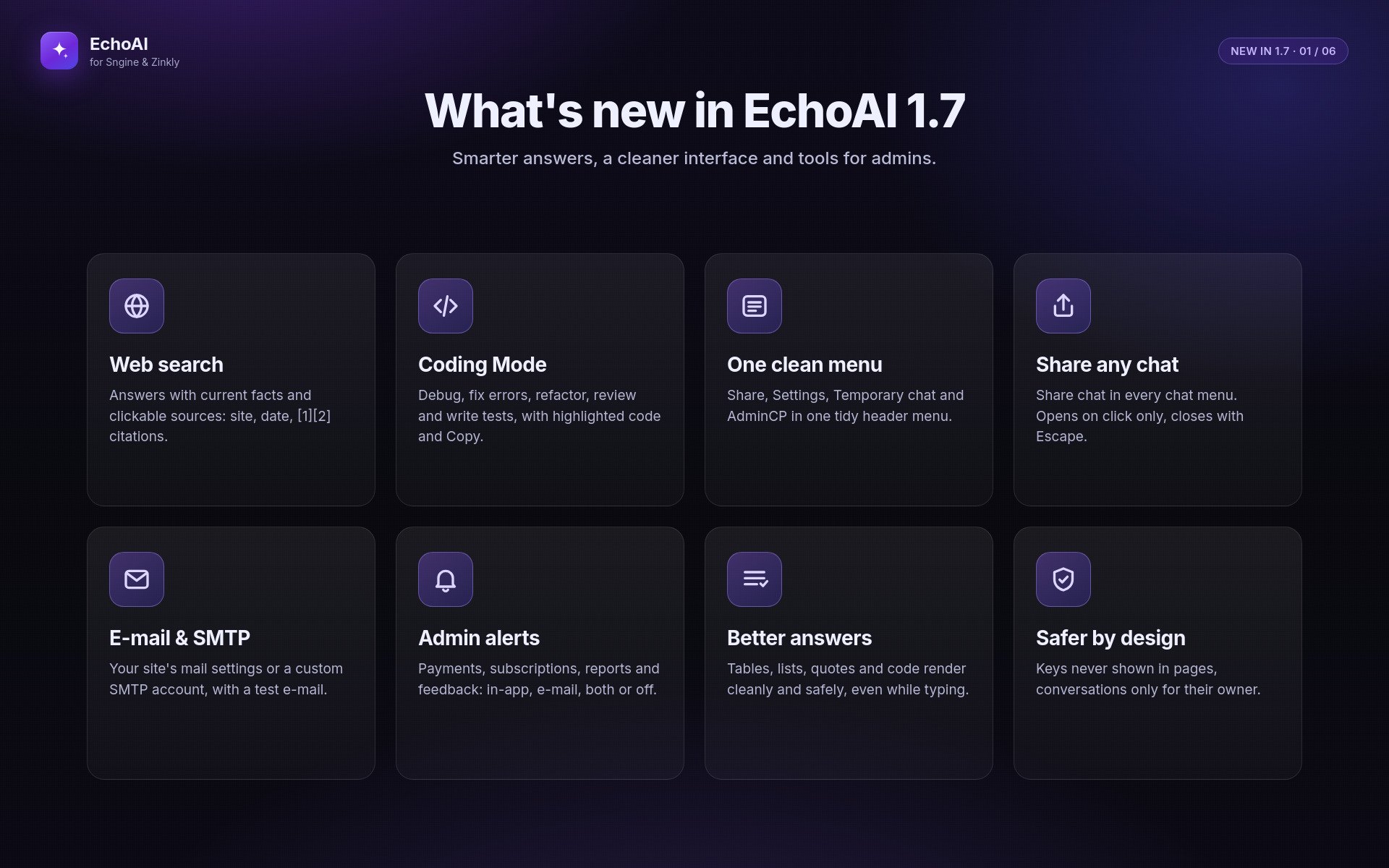
- Web search (DeepSeek Search API): the assistant searches only when a question needs current information and lists clickable sources (title, website, date) under the answer, with [1] [2] citations
- Globe button in the message box to force a web search for your messages
- AdminCP → Settings → Web Search: on/off, automatic or button-only, results per search, limits per member and per site, cache, extra tokens per search, optional separate key, Test search and a 7-day activity log
- Coding Mode (replaces the Incognito button): code-focused answers and one-click Debug, Fix error, Explain, Refactor, Review and Write tests
- Code blocks with syntax highlighting and a Copy button; tables, numbered and nested lists, quotes and safe links in answers
- Share chat in every chat's "..." menu (shares that chat, even when another one is open)
- AdminCP → Settings → Email & Alerts: e-mail through your site's mail settings or a custom SMTP account (password stored encrypted), Check connection and Send test e-mail
- Admin alerts for pending purchases, completed payments, ended subscriptions, message reports and negative feedback; each admin chooses in-app, e-mail, both or off per event; each event is sent once and failed e-mails are retried (
cron/notify_outbox.php)
Fixed
- Replies without a blank line lost all line breaks, so code blocks and lists ended up on one line
- Your own messages lost their line breaks (pasted code and lists)
- Every AI reply wrote debug lines (including members' memory facts) into AdminCP → Error Logs; only failed memory saves are logged now
- Two AdminCP pages showed PHP errors in the browser; PHP 8.1+ notices in Settings and API Keys
- Streaming with a non-DeepSeek provider could never answer; it now switches to the normal answer automatically
Revamped / Changed
- Header: the AdminCP, Share and Settings buttons are now one clean menu (This chat, Settings, Your memories and, for admins only, an Admin section)
- Chat menus open on click only (no more opening on hover) and close on a second click, Escape or a click outside; full keyboard support
- Settings and other windows close with Escape or a click outside, warn before discarding what you typed, keep keyboard focus inside and stop the page behind them from scrolling
- New message formatter: the AI's text can no longer inject HTML into the page
- Security: members can only write to and report messages in their own conversations; AI provider errors are shown as plain messages without provider details
- Security: saved API keys, the PayPal secret and the Telegram bot token are no longer printed into AdminCP pages (write-only fields with Remove and Test)
- Incognito is now "Temporary chat" in the header menu (same behaviour)
- Translations for all new texts in English, Greek, German, Spanish, Italian and Portuguese; the full guide is included offline
Migration note: from 1.4, 1.5, 1.6 or 1.6.1 (Sngine), upload
EchoAI-Update-1.7.zipin Admin → Update, then uploadadmin/settings.phpandadmin/apis.phpfrom manual-upload-files (the updater protects those two files). Zinkly: upload the EchoAI ZIP in Zinkly Panel → Extensions. No SQL is needed: the new tables are created automatically on the first page load. Web search is off after the update; turn it on in AdminCP → Settings → Web Search.
Version 1.6.1
5 fixed3 changed
Fixed
- Installer: the installer rejected its own
echoai.sql("Invalid SQL file") it now accepts the bundled file again - Installer: a clean install created no EchoAI tables (every "CREATE TABLE IF NOT EXISTS" statement was skipped while the installer still reported success) all tables are created again
- Chat: "## Heading" lines in AI replies showed "$2" instead of the heading text
- Chat: the default AI avatar (fa-star) showed a broken glyph instead of the star icon
- Upgrade window: empty plan list ("No packages available") on sites still set to Sngine packages from an older version
Revamped / Changed
- The installer now shows and records version 1.6.1 (it showed "Version 1.0")
- New download structure: 1-Clean-Install, 2-Updates (from 1.6 and from 1.4 / 1.5) and 3-Documentation
- New full documentation with screenshots (HTML + PDF) included in the download
Migration note: from 1.6, upload
EchoAI-Update-1.6.1.zipin Admin → Update (onlyindex.phpchanges). From 1.4 / 1.5, uploadEchoAI-Update-1.6.1-full.zipand mergeadmin/settings.phpmanually. No database changes are needed.
Version 1.6
5 added6 fixed4 changed2 removed
Added
- Session verification (
includes/session_guard.php): EchoAI now checks the Sngine login session (c_user+ xs againstusers_sessions) before trusting who is logged in - OpenAI GPT-6 models: GPT-6 Astra, GPT-6 Sol, GPT-6 Luna
- DeepSeek V4.1 Flash (deepseek-flash) DeepSeek V4.1 Pro listed as "Coming soon [Not yet launched]" (not selectable yet)
- New API action
get_message_feedback_countsreturns like/dislike counts for a whole conversation in one request - Addons → EchoBot → Settings opens the EchoBot Command Center (for the EchoBot 1.1 add-on)
Fixed
- Security: a forged
c_usercookie could open AdminCP and chat as any member every page, API call and admin action now requires a valid Sngine session - Security: the legacy
user_sessioncookie fallback allowed SQL injection it now accepts only plain token characters - OpenAI GPT-5.x and GPT-6 requests failed ("
max_tokensis not supported", "temperature not supported") all OpenAI calls now sendmax_completion_tokensand the default temperature for these models, and DeepSeek is unchanged - Images whose file was deleted from the server returned 404 errors and showed as broken the chat now shows a placeholder without requesting the missing file
- Mobile header overflowed on phones (the Settings gear was pushed off-screen)
- New installs were stamped version 1.3.1 they are now stamped 1.6
Removed
- AdminCP (shield) and Settings (gear) buttons from the top bar on phones (both are in the sidebar menu) desktop is unchanged
- External documentation links from the installer (it now points to the README included in the download)
Revamped / Changed
- Opening a conversation loads all like/dislike counts in one request instead of one per message (about 80 → 1 on long chats)
- Model selection in Admin → Settings → AI Configuration gains GPT-6 (Astra, Sol & Luna) and DeepSeek V4.1 groups
- Import Conversations wording made provider-neutral ("ChatGPT, DeepSeek, or another AI")
- EchoBot settings popup in Addons renamed to "EchoBot — Command Center"
Migration note:
admin/settings.phpis skipped by the in-app updater, so merge it manually to get the GPT-6 and DeepSeek V4.1 model choices in Admin → Settings. No database changes are needed.includes/config.phpneeds no edit, because the session check also loads fromincludes/functions.php.
Version 1.5
4 added2 fixed3 changed2 removed
Added
- Incognito Mode (per-message toggle, not saved to history/memory, one-time warning modal + persistent banner)
- Full PWA support (installable app,
manifest.php, service worker, "Install App" row in Settings) - Firebase Cloud Messaging push notifications (replaces OneSignal)
- 2 new interface languages: Italian, Spanish (Mexico)
Fixed
- Hamburger menu button stuck visible on desktop after resizing up from mobile width
- Admin dark-mode: .dark class was never applied anywhere (only .light-mode existed) — Admin → Update page, Dashboard Quick Actions, and system-status bar were stuck in light-mode colors
Removed
- Decorative "System Update Manager" header card from Admin → Update
- OneSignal notification integration (replaced by Firebase)
Revamped / Changed
- Memory → Backup now downloads the .json file immediately (previously just showed a toast)
- Data & Storage tab reorganized into Behavior / Data / Danger Zone sections with clearer labels
- Visual pass: Incognito modal uses real Font Awesome icons (was emoji), Settings sidebar tabs get accent-colored icon chips + row hover states, chat view gets header shadow, avatar rings, and "tail"-style message bubble corners
Migration note:
admin/settings.phpis skipped by the in-app updater — merge it manually to get the Firebase and Incognito admin fields on your live site.
Version 1.4
13 added4 fixed2 changed
New Features
- Scope Restriction — confine the assistant to specific allowed topics using a real AI classification call
- Hero / Unit Combos — ground gaming-community tactical questions in admin-curated pairing data instead of AI guesses
- Troop / Unit Calculator — exact, server-computed resource training/upgrade answers for gaming communities, never left to the AI to calculate
- Time-zone conversion — EchoAI now actually uses each user's detected browser time zone to answer "what time is X for me" questions with a real computed time, instead of leaving it unused
- Video Analysis — the AI can now analyse an uploaded video and respond about its contents, alongside the existing image recognition
- Feedback Buttons
- AI-powered info / bug-fixing system in AdminCP
- BYOK — Bring Your Own Key: users can set up their own OpenAI/DeepSeek API key and use EchoAI without your platform's usage limits
- Telegram announcement bot system
- Ability for Personality users to create Custom Personas
- Ability for Personality users to create / replace Quick Action modification
- AI timestamps — the current time and day are now included in AI responses
- Search features on AdminCP
Revamped
- Coding Playground Pro — responsive layout, theme-matched dark/light design, syntax highlighting, and a properly sandboxed live preview
- Error Log system in AdminCP — improved for support use
Fixed
- A bug where the AI could receive a user's own message duplicated as two consecutive turns, causing it to falsely claim "you typed that twice" — including on the very first message of a brand-new conversation
- A crash in a background media-cleanup routine that could take down every page load if the database's legacy files table didn't have the exact expected column names — now uses the correct columns and can no longer bring down the site even if a future mismatch occurs
- The Sngine Site URL setting being hardcoded at install time with no way to change it afterward except direct database access — it now has its own editable field in Admin → Settings
- A bug with conversation's Pin/Edit/Delete controls in the chat sidebar staying stuck open instead of only appearing on hover or via a small dedicated button
Sign in to review.
No reviews yet
Sign in to join the discussion.
No comments yet
Be the first to ask something.
Do my members need a new account?
No. EchoAI uses your site’s own login. Members are signed in automatically with their Sngine or Zinkly account.
Which AI providers does it support?
OpenAI and DeepSeek. You can add one or both keys and choose the default in the Admin Panel.
Do I have to pay for the AI separately?
Yes. You pay OpenAI or DeepSeek directly for what your members use. You can cover this cost by selling token packages.
Can members use their own API key?
Yes. With BYOK (Bring Your Own Key), members can add their own key in their settings.
How do I make money with EchoAI?
Sell token packages through PayPal or bank transfer. On Zinkly, you can also use your VIP Packages as EchoAI plans.
Does it work on mobile?
Yes. It works on any screen size, and members can install it like an app.
Which languages are included?
English, German, Greek, Spanish, Italian and Portuguese.
Does EchoAI change my Sngine or Zinkly files?
No. It stays in its own echoai folder and only adds its own database tables.
Do I need cron jobs?
Sngine: they’re recommended, for token resets, payment checks and memory cleanup. Zinkly: no. The Zinkly scheduler runs these jobs for you.
Will updating delete my data?
No. Your settings, uploads, conversations and memories are kept in every update.
“Text generation is disabled by administrator.” What does this mean?
You need to add an API key and turn text generation on. Sngine: add the key in Admin Panel › API Keys, then turn on text generation in Settings. Zinkly: add the key in Zinkly Panel › AI › ZinklyAI & API Keys, then turn it on in Zinkly Panel › EchoAI › EchoAI Settings.
“The model does not exist.” What does this mean?
Your OpenAI account doesn’t have access to that model yet. Choose a different model in Settings.
Zinkly: members are sent to the login page. How do I fix it?
Make sure SESSION_DRIVER=file is set in your .env file. Then run php artisan echoai:install again.
Zinkly: “This package has no Zinkly implementation of EchoAI.” What does this mean?
You uploaded the Sngine version. Use the download that contains the Zinkly folder.
Can I turn EchoAI off without losing anything?
Zinkly: yes. Disable it in Zinkly Panel › Extensions. Your files and data are kept, and Enable brings everything back. Sngine: rename or remove the echoai folder. Your data stays in the database.
Can I add more features?
Yes. EchoAI has an add-ons and themes system. Coding Playground Pro, EchoBot and the Echo Nebula theme are available.
What support includes
- Help installing EchoAI on Sngine or Zinkly
- Help setting up API keys, models, payments and push notifications
- Fixes for bugs in EchoAI
- Answers to questions about features and settings
What support doesn’t include
- Custom changes or new features made just for you
- Problems caused by editing EchoAI’s files, or by third-party add-ons and themes
- Server or hosting setup, or problems with your own Sngine or Zinkly installation
- Costs from AI providers (OpenAI, DeepSeek) or other paid services
How to get help
- Email: [your support email]
- Support period: [for example, 6 months from purchase]
- Response time: usually within [24–48 hours] on working days
Please send us
- Your edition and version (Sngine or Zinkly, and the version number)
- Your site URL
- What happened, with screenshots or the exact error message
- Anything shown in Admin Panel › Error Logs
Updates
How updates work
- Free updates: every buyer gets new versions of EchoAI at no extra cost.
- Update alerts: EchoAI checks for new versions once a day and shows a banner in your Admin Panel when one is ready.
- Nothing installs on its own: you decide when to update, and nothing is downloaded until you click.
- One-click updates (Sngine): go to Admin Panel › Update. You can also update by FTP.
- Extensions page (Zinkly): go to Zinkly Panel › Extensions and upload the new ZIP. Your current files are backed up before anything changes.
Your data is safe
- Your settings, uploads, add-ons, conversations, memories and user data are always kept.
- Database updates only add new tables. They never change or delete your existing data.
- Your configuration files are never overwritten.
- On Zinkly, an older version can’t be installed over a newer one. You can reinstall the same version to repair it.
Message the author Private, only you and the author see it.
More like this
FireNotify – Firebase Push Notifications for Sngine
ZinklyStudio
LingoSync — The Ultimate AI Translator for Sngine + VisionAI
ZinklyStudio