LingoSync — The Ultimate AI Translator for Sngine + VisionAI
Features
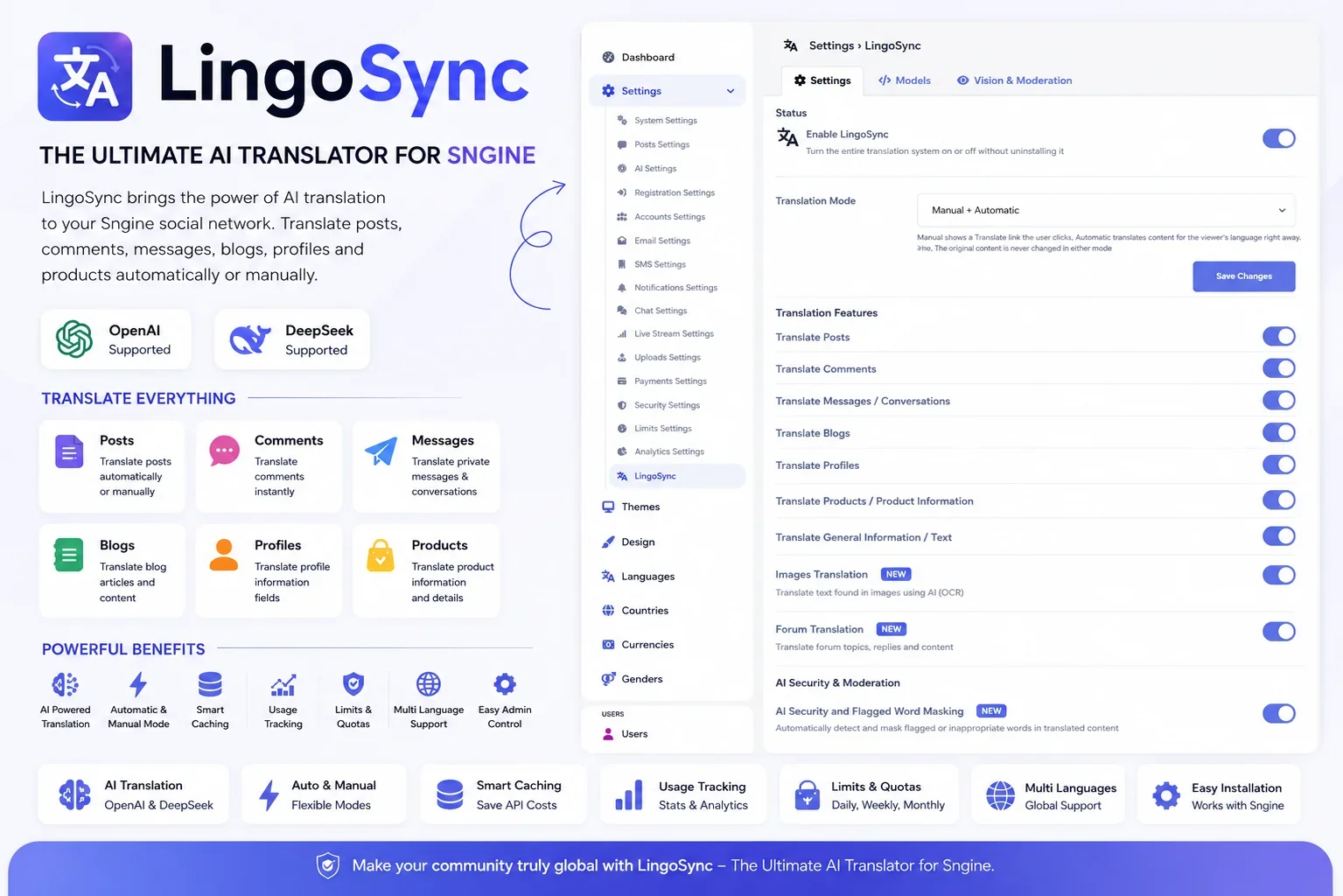
23 features- AI translationWhat it translates (each one has its own on/off switch)AI VisionAI ModerationSave money and stay in controlClean integration
- Server-side translation: your OpenAI or DeepSeek key is never sent to the browser.
- Two AI providers: switch between OpenAI and DeepSeek in AdminCP at any time.
Three modes:2
- Manual: members tap “Translate”
- Automatic: content is translated instantly for every viewer
Both together18
- Choose your languages: 10 languages are set up by default (English, Greek, German, French, Spanish, Italian, Portuguese, Dutch, Turkish and Polish), and you can add more.
- Model settings: choose the model, temperature, max tokens and timeout for each provider.
- Posts
- Comments
- Private messages
- Group and event chat (new in 1.3)
- Blogs
- Forums: forum names, descriptions, threads and replies
- Profiles, products and general text
- Translate text in images: reads the text in photos, screenshots, signs and memes, and translates it.
- AI Image Scan tool: admins can upload an image and ask the AI anything about it.
- Masks offensive words in translated text. Only the bad words are hidden, and the rest of the message stays as it was.
- Your content is safe: moderation only runs on the translated copy, never on the original.
- Smart caching: the same text is never sent to the AI twice, and the same goes for the same image.
- Usage limits: set daily, weekly, monthly or yearly limits, or leave them unlimited.
- Live usage dashboard: see requests, cache hits, API calls and failures for today, this week, this month and this year.
- Uses its own buttons, so it never clashes with Sngine’s built-in translator.
- Only adds two new tables to your database and never changes your existing data.
LingoSync brings AI translation to your Sngine community, powered by OpenAI or DeepSeek. Members can read posts, comments, messages, blogs, forums, group chats and even the text inside images in their own language.
Sngine’s built-in translator runs in the visitor’s browser, so your Google or Yandex API key is visible in the page source for anyone to copy. LingoSync replaces it with a server-side translator. Your AI key never leaves your server, every translation is cached to save money, and you get usage tracking and spending limits in AdminCP.
Your original content is never changed. Translations are only shown to the person reading them.
Requirements
- Sngine [confirm the version]. The package files are built for Sngine 4.x (see the note at the end).
- PHP, the same version your Sngine already uses
- MySQL or MariaDB. LingoSync adds 2 new tables and some settings.
- An OpenAI or DeepSeek API key. You only need a key for the provider you use.
- A vision model for AI Vision features (optional): OpenAI gpt-4o or a DeepSeek vision model
- phpMyAdmin access, or another way to run SQL files
- SFTP or SSH access is recommended for uploading
Installation
- Back up first. Back up your database and all your website files.
- Import the database. Open phpMyAdmin, select your Sngine database, go to Import and choose sql/lingosync_install.sql.
- Upload the new files from the LingoSync folder to the same paths on your server:
- includes/lingosync.php
- includes/ajax/lingosync/ (translate.php, translate_image.php, translate_forum.php, render_message.php)
- includes/ajax/admin/lingosync/scan_image.php
- includes/assets/js/core/lingosync.js
- includes/assets/css/lingosync.css
- Upload the replacement files, in this order:
- admin.php and includes/ajax/admin/settings.php
- The theme templates from content/themes/default/ (or content/themes/xngine/)
- bootstrap.php, last of all
- Clear the cache. Clear content/themes/YOUR-THEME/templates_compiled/ and restart PHP if you can.
- Turn it on. Go to AdminCP › Settings › LingoSync:
- Switch on “Enable LingoSync”
- Choose a translation mode
- In the Models tab, choose your AI provider and paste your API key
- In Translation Features, switch on what you want translated
- Save, then open a page with content in another language to test it
Tip: upload over SFTP or SSH, not a browser file manager. If one file doesn’t upload fully, bootstrap.php can break every page on your site.
Version 1.3
Latest
No notes for this release.
Sign in to review.
No reviews yet
Sign in to join the discussion.
No comments yet
Be the first to ask something.
Do I have to pay for the AI separately?
Yes. You pay OpenAI or DeepSeek directly. Caching keeps your costs low because the same text is never translated twice.
Is my API key safe?
Yes. Unlike Sngine’s built-in translator, your key stays on your server and is never shown in the page source.
Does LingoSync change my members’ posts?
In Manual mode, members tap “Translate”. In Automatic mode, content is translated for every viewer straight away. You can also use both together.
How do I stop my AI bill from growing too much?
Set a daily, weekly, monthly or yearly limit in AdminCP › Settings › LingoSync. You can see your usage live on the dashboard.
Can it translate text inside images?
Yes. Turn on image translation and choose a vision model, like OpenAI gpt-4o.
What does AI Moderation do?
It hides offensive words in translated text and leaves the rest of the message as it is. It never changes the original.
Which languages are supported?
10 languages are set up by default, and you can add more language codes in the settings.
Does it work with my theme?
The default and Xngine themes are fully supported. For other themes, copy the LingoSync code from the Xngine templates into your theme.
I see “Translation service not available!” when I tap Translate. What should I do?
Update to version 1.3, which fixes this.
My site shows errors or a blank page after installing. What should I do?
Usually a file didn’t upload fully. Check your error log, which names the missing file. Upload it again, then clear templates_compiled.
Is it safe to run the SQL files again?
Yes. They only add what’s missing and never overwrite your settings.
All support, updates and new addons are on ZinklyMedia: https://social.zinkly.org/
Documentation: https://docs.zinkly.org/lingosync.php
What support includes
- Help with installation and updates
- Help setting up OpenAI or DeepSeek
- Fixes for bugs in LingoSync
What support doesn’t include
- Custom changes, or adding LingoSync to other themes for you (available as paid custom work)
- Problems caused by editing the files, or by other addons
- AI provider costs, or server and hosting problems
Please send us
- Your Sngine version and theme name
- Your LingoSync version
- What happened, with screenshots or the exact error from your error log
Support period: [for example, 6 months from purchase]
Response time: usually within [24–48 hours] on working days
Important: this is the only official LingoSync. Avoid cracked or nulled copies, because they may contain malware.
Updates
- Lifetime free updates: every buyer with an official license gets all new versions at no extra cost.
- Safe database updates: they only add new settings, and you can run them again safely. Your saved settings are never overwritten.
- Your content is safe: updates never change your posts, comments, messages or other content.
- Back up first: always back up before updating. If something goes wrong, restore your backup and update again one group of files at a time.
- Sngine updates: if you update Sngine itself, check that LingoSync still supports your new version before you upload LingoSync’s files again.
Message the author Private, only you and the author see it.
More like this
FireNotify – Firebase Push Notifications for Sngine
ZinklyStudio