NotiLive: The Ultimate Sngine Notification Addon
Send targeted and scheduled notifications on Sngine 5 to the right users, at the right time. Every send is tracked with seen stats, and safeguards help prevent accidental spam.
Features
37 features- 🎯 Advanced Audience Targeting📅 Scheduled Delivery📊 History & Logs🛡️ Sending Safeguards✨ Beautiful Notifications⚙️ Built for Sngine 5
- Send to all users, filtered users, or up to 100 selected users (the limit is adjustable)
- Filter by role (Admins, Moderators, Users) and custom Users Groups
- Filter by membership: Pro or Free, including specific packages
- Filter by registration date range
- Filter by verification: verified badge or email verified
- Filter by activity: active or inactive in the last N days
- Banned and not-activated accounts are left out by default
- A live recipient count updates as you build the audience
- Send now, or schedule a date and time in your own timezone
- Edit, send now or cancel any scheduled notification before it goes out
- A one-minute scheduler, with a status indicator in Settings
- Each notification is delivered once, even if two triggers fire at the same time
- Full history with search by ID, message, name, URL, audience or sender
- Filters for status, tag and date range, with pagination
- For each notification: creator, audience, estimated and delivered recipients, timestamps, errors and seen count
- A complete activity log: created, scheduled, edited, sent, failed, canceled
- Duplicate any previous notification in one click
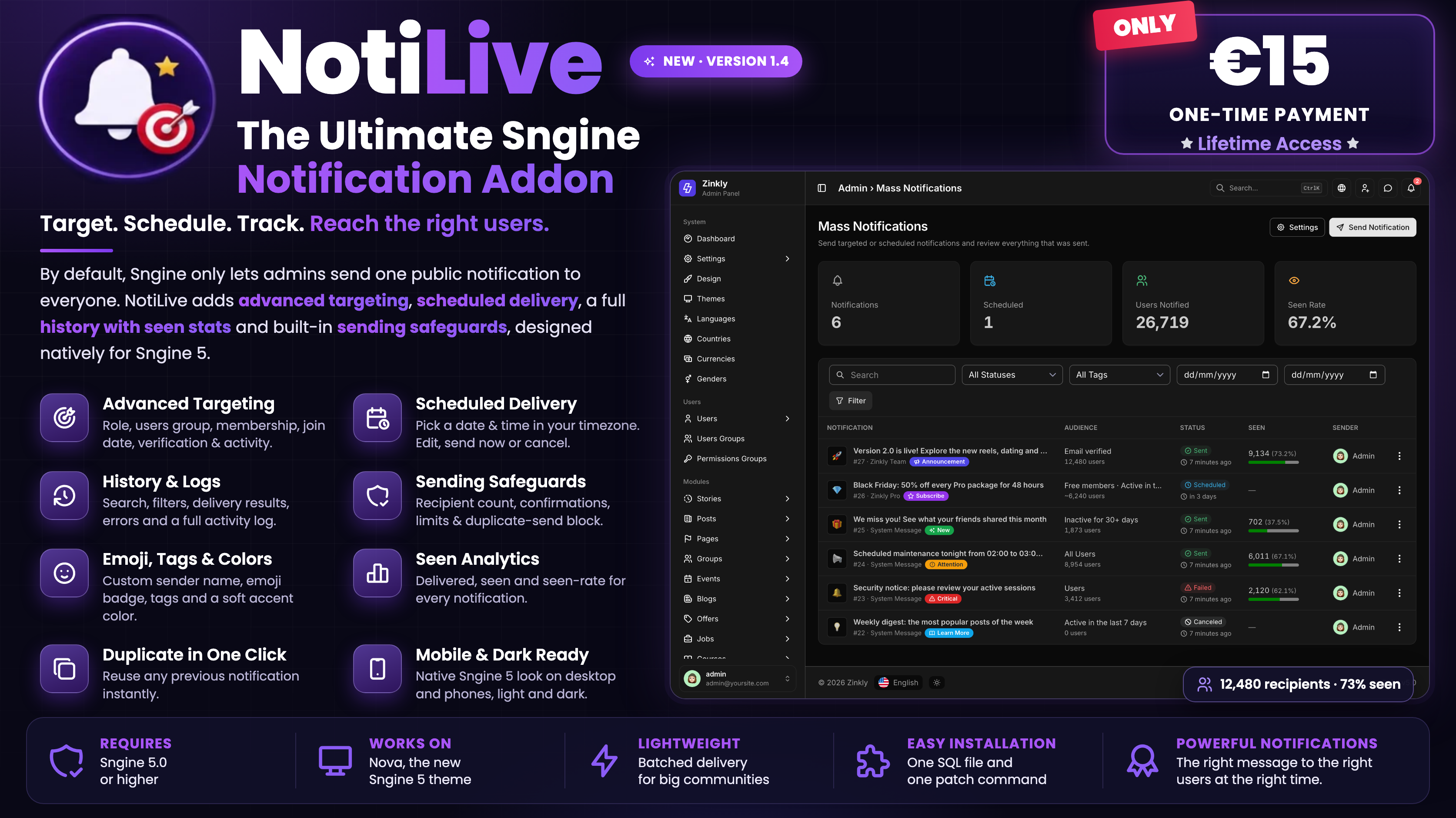
- Stats cards for total notifications, scheduled, users notified and seen rate
- Recipient count before sending, and a confirmation for large broadcasts
- Duplicate-send protection: the same message to the same audience is blocked for a set time
- Limits for recipients per notification, moderators, and sends per day
- Permission checks: moderators need the “Moderators Reach” permission and can manage only their own notifications
- Large audiences are sent in batches, with no heavy database load
- A log of blocked attempts and settings changes
- Custom sender name in place of “System Message”
- An emoji badge on the notification
- Colored tags: Announcement, Critical, New, Attention, Learn More, Subscribe
- A soft accent color that stays readable in light and dark mode
- Multi-line messages and a live preview while you write
- Notifications pop up live, using Sngine 5’s own live system
- A native Nova theme design that looks right on desktop and phones, light and dark
- Compatible with Smarty 5 and jQuery 4
- No Sngine core files are replaced; only four small, marked hooks are added
- Easy install: one SQL file and one command, which you can re-run after Sngine updates
- Upgrades any older NotiLive version (1.0 to 1.3) directly, keeping your data
- Fully translatable through Sngine’s language system
By default, Sngine lets admins send one public notification to everyone. NotiLive replaces that with a full notification center inside your AdminCP.
Target exactly who you want. Combine filters for role, users group, membership (Pro or Free, including specific packages), registration date, verification status and activity, or pick up to 100 users by name. A live recipient count shows how many people will receive the message before you send it.
Plan ahead. Schedule launches, maintenance notices and events for any date and time in your own timezone. Until it goes out, you can edit it, send it immediately or cancel it.
Know what happened. Every notification is recorded in a searchable history: who sent it, to which audience, how many people received and saw it, when, and any errors. Each one has a full activity log, and you can duplicate any past notification in one click.
Send safely. NotiLive asks for confirmation before large broadcasts. It also blocks the same message being sent to the same audience twice by accident. You can set recipient and daily limits, cap moderators, and every action is permission-checked. Large audiences are delivered in batches, so your database stays fast.
Stand out in the notification list. Each notification can have a custom sender name, an emoji badge, a colored tag (Announcement, Critical, New, Attention, Learn More, Subscribe) and a soft accent color. It looks native on desktop and phones, in light and dark mode, and pops up live.
Built for Sngine 5. NotiLive is designed natively for Nova, the Sngine 5 theme, and works with Smarty 5 and jQuery 4. It doesn’t replace any Sngine core file: it adds four small, marked hooks with one command, which you can re-run after Sngine updates. Updating from an older NotiLive version? One update upgrades 1.0–1.3 directly to 1.4 and keeps your data.
Requirements
- Sngine 5.0+ ·
- Works on: Nova (the Sngine 5 theme) ·
- €15, one-time payment with lifetime access
Installation
- Back up your database and website files.
- Upload everything inside the Script folder to your Sngine root folder, overwriting the existing files. These are:
- includes/traits/notifications.php
- includes/ajax/admin/notifications.php
- includes/ajax/admin/search_users.php
- includes/ajax/admin/get_groups.php
- content/themes/default/templates/admin.notifications.tpl
- content/themes/default/templates/__feeds_notification.tpl
- Open phpMyAdmin, select your Sngine database, and import notifications.sql.
- If you use a custom theme, copy these two files into content/themes/YOUR-THEME/templates/:
- admin.notifications.tpl
- __feeds_notification.tpl
- Clear your template cache.
- Go to AdminCP › Mass or Targeted Notifications and send your first notification.
Version 1.4
Latest
No notes for this release.
Version 1.3
3 added1 fixed
Added
- Tags option for notifications
- Preview before sending notifications
- Compatibility with Sngine v4.5
Fixed
- UTF-8 issue that broke Announcements
Special thanks to @Agulha74 for reporting the bugs with UTF-8 to us!
Version 1.2.1
5 fixed
Fixed
- Notification line breaks displaying as one run-on line.
- Custom notification background color not being saved.
- Custom notification name not being saved.
- Fatal error when notifying a Role / Users Group.
- Translated "System Message" appearing as mixed-language text.
Special thanks to @Agulha74 for reporting the bug to us!
Version 1.2
3 added1 changed
Added
- Custom Notification Name
- Notification Background Colors
- Send To Role/Group
Improvements
- Notification delivery with an efficient group/role query designed to handle large user groups without unnecessary database load.
Sign in to review.
No reviews yet
Sign in to join the discussion.
No comments yet
Be the first to ask something.
Does NotiLive replace Sngine’s mass notifications?
Yes. It upgrades the existing AdminCP page, so you don’t need to learn a new tool.
Can I send to just a few people?
Yes. Choose “Specific Users” and pick up to 20 users by username or full name.
Can I send to only my moderators, or to a custom group?
Yes. Choose “Role / Users Group”, then pick Admins, Moderators, Users or any custom users group.
What happens if I don’t choose an emoji or a name?
The notification uses the default bell icon and the name “System Message”.
Can moderators send notifications?
Yes, if they have the right permission in Sngine.
Will other admins know when a notification is sent?
Yes. When a notification goes to specific users or a group, every admin gets an alert with who sent it and how many users received it.
Is it safe to run the SQL file twice?
Yes. It checks each column first and only adds what’s missing.
I use a custom theme. Will it work?
Yes. Copy the two theme files (admin.notifications.tpl and __feeds_notification.tpl) into your theme’s templates folder.
Does it work with Elengine or Xngine?
Their theme files are coming soon and will be added to the same package.
Nothing changed after I installed it. What should I do?
Clear your template cache and refresh the page. If it still doesn’t work, check that the SQL file was imported.
Will updating delete my notifications?
No. Updates only add new columns, and your existing notifications stay.
All support, updates and new addons are now on our new platform, ZinklyMedia: https://zinkly.org/
What support includes
- Help with installation and updates
- Fixes for bugs in NotiLive
- Answers about features and settings
What support doesn’t include
- Custom changes or new features made just for you
- Problems caused by editing NotiLive’s files, or by other addons and themes
- Server or hosting problems
Please send us
- Your Sngine version and theme name
- What happened, with screenshots or the exact error message
Support period: [for example, 6 months from purchase]
Response time: usually within [24–48 hours] on working days
Updates
- Free updates: every buyer gets new versions of NotiLive at no extra cost.
- Same package: new theme files, like Elengine and Xngine, are added to the same package instead of a separate update.
- Bug fixes: if a bug is found, a new update is released to fix it.
- Safe database updates: they only add new columns and never delete your notifications or data.
- Back up first: always back up your database and files before updating.
Message the author Private, only you and the author see it.
More like this
FireNotify – Firebase Push Notifications for Sngine
ZinklyStudio
LingoSync — The Ultimate AI Translator for Sngine + VisionAI
ZinklyStudio